
-
-
Save krishpop/8a954b171a5403117bf0f2fdda0a8e90 to your computer and use it in GitHub Desktop.
| // code courtesy of Toby team | |
| chrome.storage.local.get("state", o => ( | |
| ((f, t) => { | |
| let e = document.createElement("a"); | |
| e.setAttribute("href", `data:text/plain;charset=utf-8,${encodeURIComponent(t)}`); | |
| e.setAttribute("download", f); | |
| e.click(); | |
| })(`TobyBackup${Date.now()}.json`, o.state) | |
| )); |


I would also like to know. Thanks in advance!

@klevstul @correcto just run it in the chrome console window, and it should let you save a backup json

Thanks! This is really helpful!

Thanks for this. The reason I can't fully get onboard with Toby is that there is no export feature. Meaning that it would be very difficult to move away from it if you decide to in the future.
Your script worked great. Do you know of any process that I can use to make this readable for an import feature in Chrome or Firefox? Thanks.

Is there an easy way to get a list of just the URLs?
http://url1.com
http://url2.com
http://url3.com
http://url4.com
http://url5.com
http://url6.com
http://url7.com
...
http://urln.com

Hi,
Just tried the script in the console. got Failed Network error.

Works great! Thank you

Worked perfectly! Thanks so much, @krishpop

Hi,
Just tried the script in the console. got Failed Network error.
I had the same issue until I saw my error mention 'local' so I tried running the script with Chrome open on a main Toby ~ dashboard ~ tab and it worked like a charm.
Much appreciated!

Great piece of code, thanks a lot!
Is there an easy way to get a list of just the URLs?
http://url1.com
http://url2.com
http://url3.com
http://url4.com
http://url5.com
http://url6.com
http://url7.com
...
http://urln.com
@dwiehoff: To get a flat list of all the URL's in a JSON export, you can use a command-line tool like jq:
jq '.lists[].cards[].url' your_backup_file_name.json
You could also solve this in the Javascript code probably, but this got the job done for me.
(please note: not tested on any other version besides the JSON export I just created myself)
For more info on jq, see also:
https://stedolan.github.io/jq/
https://thoughtbot.com/blog/jq-is-sed-for-json

For a simplified (and readable) JSON export, you can use this:
chrome.storage.local.get("state", ({ state }) => {
  const lists = JSON.parse(state).lists.map(({title, cards}) => ({
    title,
    cards: cards.map(({ customTitle, title, url }) => ({
      title: customTitle || title,
      url,
    })),
  }));

  let e = document.createElement("a");
  e.setAttribute("href", `data:text/plain;charset=utf-8,${encodeURIComponent(JSON.stringify(lists, null, 2))}`);
  e.setAttribute("download", `TobyBackup${Date.now()}.json`);
  e.click();
});
And for a human readable export to a text file (in markdown format), you can use this:
chrome.storage.local.get("state", ({ state }) => {
  const markdown = `
# Toby Export
${JSON.parse(state).lists.map(({title, cards}) => `## ${title}
${cards.map(({ customTitle, title, url }) => `- [${customTitle || title}](${url})`).join('\n')}`).join('\n\n')}`;
  let e = document.createElement("a");
  e.setAttribute("href", `data:text/plain;charset=utf-8,${encodeURIComponent(markdown)}`);
  e.setAttribute("download", `TobyBackup${Date.now()}.md`);
  e.click();
});
You can then open the .md file in any text editor, or copy+paste the export into a Markdown editor such as https://dillinger.io/ to get clickable links.

@jesstelford Fantastic, thank you!

Great piece of code, thanks a lot!
Is there an easy way to get a list of just the URLs?
http://url1.com
http://url2.com
http://url3.com
http://url4.com
http://url5.com
http://url6.com
http://url7.com
...
http://urln.com@dwiehoff: To get a flat list of all the URL's in a JSON export, you can use a command-line tool like jq:
jq '.lists[].cards[].url' your_backup_file_name.jsonYou could also solve this in the Javascript code probably, but this got the job done for me.
(please note: not tested on any other version besides the JSON export I just created myself)
For more info on jq, see also:
https://stedolan.github.io/jq/
https://thoughtbot.com/blog/jq-is-sed-for-json
@pietervanw Any thoughts on how to grab the URLs of a specific list by the title?
@nickmadedesign:
with jq, try this:
jq '.lists[] | select(.title == "Name of the List") | .cards[].url' your_backup_file.json
To list all your lists, do this:
jq '.lists[].title' your_backup_file.json
Again, this can also be solved in JavaScript but if you like having a full backup and extracting your relevant data from that, then this would work.
@nickmadedesign:
with jq, try this:
jq '.lists[] | select(.title == "Name of the List") | .cards[].url' your_backup_file.jsonTo list all your lists, do this:
jq '.lists[].title' your_backup_file.jsonAgain, this can also be solved in JavaScript but if you like having a full backup and extracting your relevant data from that, then this would work.
Ah, right. Perfect. Thank you!

I am counting that this thread is still visited by people who can help me. I was careless and have not created my account with Toby, so all of my saved URLs are on my local files system, created under the account name defined by my local logon to Chrome browser.
Yesterday, I had to logout from Chrome - and I forgot to check which account was used to create Toby list of URL. So getting back to use my Toby collections - I got this:
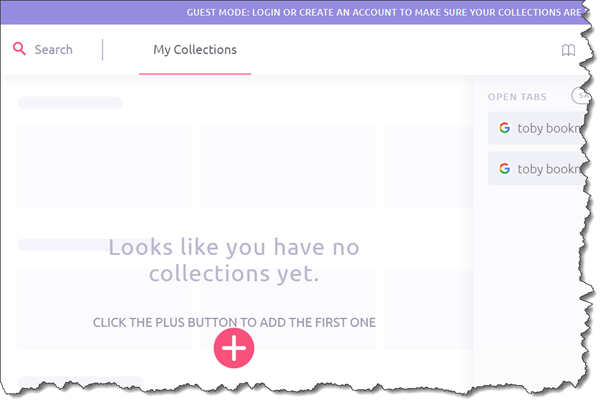
The screenshot indicates how I was perceived as a guest (of Toby), so I tried all of my Chrome accounts, to get to see my two pages worth of bookmarks, to no avail. Is there a way to get my painfully collected urls?

Is there a way to do the inverse? take an export (in JSON for example) and inject it to Toby's local storage

put into chrome console and keep getting:
Uncaught TypeError: Cannot read property ‘local’ of undefined at :1:16

Thanks for this. Do you guys know how to import the exported collection to say a new account?

chrome.storage.local.get("state", o => (
((f, t) => {
let e = document.createElement("a");
e.setAttribute("href", 'data:text/plain;charset=utf-8,${encodeURIComponent(t)}');
e.setAttribute("download", f);
e.click();
})('TobyBackup${Date.now()}.json', o.state)
));
VM44:1 Uncaught TypeError: Cannot read property 'local' of undefined
at :1:16
dummy me it got resolved when i ran it in toby page ^^^

put into chrome console and keep getting:
Uncaught TypeError: Cannot read property ‘local’ of undefined at :1:16
u gotta open Toby tab, ctrl shift J, copy paste the command, then it will prompt n download ur saved URL
hi!
could you please elaborate on how you're using this for exporting toby data?
thanks!
cheers,
frode.