- Why use the terminal?
- Terminal applications
- The prompt
- Using history
- Using the keyboard
Words: 2,837

| (* | |
| Export All Safari Tabs in All Open Windows to a Markdown File | |
| July 13, 2015 | |
| // SCRIPT PAGE | |
| http://hegde.me/urlsafari | |
| // ORIGINAL SCRIPT ON WHICH THIS SCRIPT IS BUILT | |
| http://veritrope.com/code/export-all-safari-tabs-to-a-text-file |

| javascript:(function() { | |
| function copyToClipboard(text) { | |
| if (window.clipboardData && window.clipboardData.setData) { | |
| /*IE specific code path to prevent textarea being shown while dialog is visible.*/ | |
| return clipboardData.setData("Text", text); | |
| } else if (document.queryCommandSupported && document.queryCommandSupported("copy")) { | |
| var textarea = document.createElement("textarea"); | |
| textarea.textContent = text; |


| -- HOWTO: | |
| -- after saving it, open with Script Editor (default) and run it | |
| -- PREREQUISITES: | |
| -- make sure your Keynote presentation is open in the background | |
| -- AFTER EXPORT: | |
| -- if you can't open the file due to encoding errors, open with Sublime (or another a text editor) and then "File / Save with encoding / UTF8" | |
| tell application "Keynote" |

| #!/usr/bin/python | |
| import csv | |
| import json | |
| import requests | |
| import configparser | |
| """ | |
| Usage: | |
| Add the following to config.ini with appropriate values: |

exFAT support on macOS seems to have some bugs because my external drives with exFAT formatting will randomly get corrupted.
If Disk Utility is unable to repair, consider trying this:
diskutil list to find the right drive id.disk1s1sudo fsck_exfat -d <id from above>. eg sudo fsck_exfat -d disk1s3-d is debug so you'll see all your files output as they're processed.
I like (love ?) Keynote because it
If I could remove that last argument, I would, but the fact is that, as a consultant, the final document is almost always expected to be a powerpoint document. Don't ask me why, it is just so. I am fighting against it but I did not win the battle so far ...

| #!/usr/bin/env node | |
| /* | |
| Generate a markdown links list from iCloud tabs, on macOS | |
| Usage: | |
| ./icloudtabs2md.js > icloudtabs.md | |
| ./icloudtabs2md.js | pbcopy | |
| Require: |

| #!/usr/bin/env ruby | |
| # Input arguments | |
| source_path = ARGV[0] | |
| destinationPath = ARGV[1] || '~/Desktop/ember_backup' | |
| # Creade destination directory if it doesn't exist | |
| `mkdir -p #{destinationPath}` | |
| # Find the embersnaps in the directory and count them |

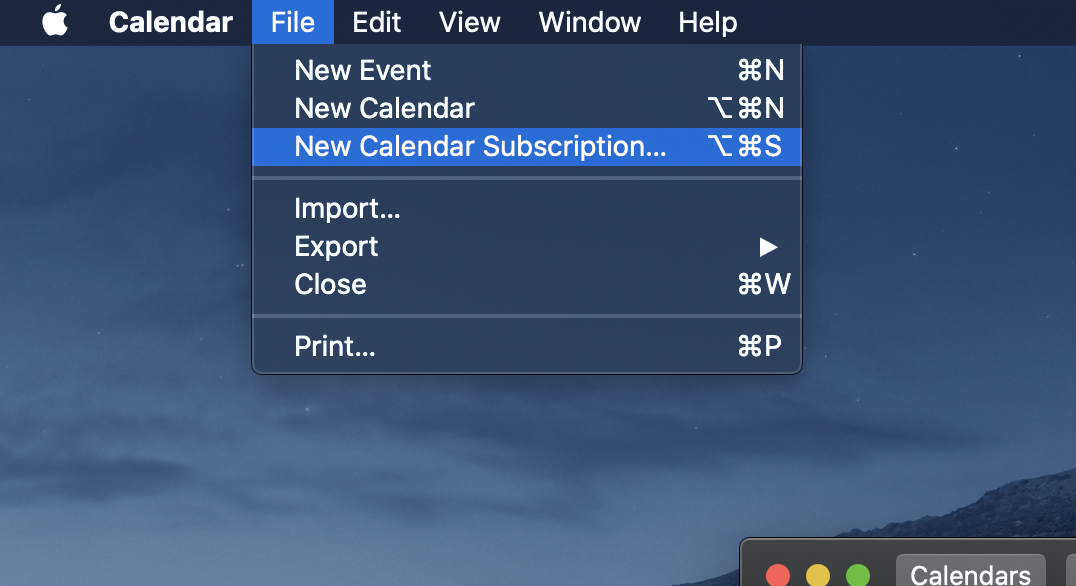
If you'd like to follow along with the small seasons calendar via iCal, you'll want to create a new calendar subscription. On Mac, you can do this by going to File > New Calendar Subscription…
Into the panel that opens, paste the following URL:
https://calendar.google.com/calendar/ical/4eu29iflrjlhahh3kusp454n2c%40group.calendar.google.com/private-3f3d86651493934f026c4aca11baaf02/basic.ics