Skip to content

Instantly share code, notes, and snippets.

@mrkpatchaa
Last active May 21, 2026 17:14
Show Gist options
  • Select an option

  • Save mrkpatchaa/63720cbf744a2bf59a3e9cfe73fc33b0 to your computer and use it in GitHub Desktop.

Select an option

Save mrkpatchaa/63720cbf744a2bf59a3e9cfe73fc33b0 to your computer and use it in GitHub Desktop.
Bulk delete github repos

Use this trick to bulk delete your old repos or old forks

(Inspired by https://medium.com/@icanhazedit/clean-up-unused-github-rpositories-c2549294ee45#.3hwv4nxv5)

  1. Open in a new tab all to-be-deleted github repositores (Use the mouse’s middle click or Ctrl + Click) https://github.com/username?tab=repositories

  2. Use one tab https://chrome.google.com/webstore/detail/onetab/chphlpgkkbolifaimnlloiipkdnihall to shorten them to a list.

  3. Save that list to some path

  4. The list should be in the form of “ur_username\repo_name” per line. Use regex search (Sublime text could help). Search for ' |.*' and replace by empty.

  5. Register a new personal access token with a 'delete_repo perm' https://github.com/settings/tokens/new

  6. Copy the access_token and run the following line replacing xxx with your access token.

Linux and OS X :

while read r;do curl -XDELETE -H 'Authorization: token xxx' "https://api.github.com/repos/$r ";done < repos

Windows:

get-content D:\repolist.txt | ForEach-Object { Invoke-WebRequest -Uri https://api.github.com/repos/$_ -Method “DELETE” -Headers @{"Authorization"="token xxx"} }

Caution

I have only tested this script on Linux.

Have fun :)

@onursagir

Copy link
Copy Markdown

I've also written a small Node application that requires no installation, simply running npx bulk-delete-repo should do the trick

@dawesi

dawesi commented Apr 19, 2022

Copy link
Copy Markdown

Repo remover only does personal repos not orgs :-(

@moollaza

moollaza commented Apr 20, 2022

Copy link
Copy Markdown

Repo remover only does personal repos not orgs :-(

@dawesi, org repos should be supported. Do you have permissions to edit the repos in the org? Alternatively, are they private org repos?

If they are private, there is an open PR I need to review which should add support for those

Edit:
I've deployed the PR with support for Private Org repos here: https://repo-remover-op56z4vb4-moollaza.vercel.app/
The PR with the change is here for anyone interested: moollaza/repo-remover#182

@luigi-smilzo

Copy link
Copy Markdown

In case anyone is interested, I built a little web app that helps you delete (or archive) multiple GitHub repos. It displays all your repos, and allows you to sort/filter them, and select which ones you want to modify. Under the hood, it just uses the GitHub API and an access token you provide.

You can try it out to at https://reporemover.xyz/.

It’s also open source, and available on GitHub.

Very, very, very helpful. Thank you!

@airtonix

airtonix commented Oct 30, 2022

Copy link
Copy Markdown

...

@infr

infr commented Nov 4, 2022

Copy link
Copy Markdown

For deleting organization team repos

  1. Generate a personal access token with 'delete_repo' permission: https://github.com/settings/tokens/new
  2. Open the teams repositories view and run following in the browsers console
let repos = ''
const el = document.querySelectorAll('#org-team-repositories > ul > li > div:nth-child(1) > div > div:nth-child(2) > a > span').forEach(e => {repos = repos + `"${e.innerText}"\n`})
console.log(repos)
  1. Copy paste the output to @aug2uag shell script and run it (fixed extra space typo in it):
#!/bin/bash

repos=(
	"username/repo1"
	"username/repo2"
	"username/repo3"
)

for i in "${repos[@]}"
do
   : 
   echo 'Delete' "$i";
   curl -XDELETE -H 'Authorization: token XXXX' "https://api.github.com/repos/$i";
done

@connorferster

Copy link
Copy Markdown

@moollaza

I am generating the token from your link but the reporemover is telling me that the token is invalid? My tokens all start with ghp_ but reporemover is telling me they are invalid because of the underscore. Thoughts?

@moollaza

Copy link
Copy Markdown

@connorferster are you sure you don't have a typo? I just tested the link and generated a token with the ghp_ prefix and it worked. Open an issue on GitHub or via email and I can try to see what's going on.

@sandro-git

Copy link
Copy Markdown

In case anyone is interested, I built a little web app that helps you delete (or archive) multiple GitHub repos. It displays all your repos, and allows you to sort/filter them, and select which ones you want to modify. Under the hood, it just uses the GitHub API and an access token you provide.
You can try it out to at https://reporemover.xyz/.
It’s also open source, and available on GitHub.

Very, very, very helpful. Thank you!

awesome !!!!!!

@JaydotMurf

Copy link
Copy Markdown

@sandro-git This is awesome! Thanks for all your hard work putting the web app together.

@Codechiha

Copy link
Copy Markdown

In case anyone is interested, I built a little web app that helps you delete (or archive) multiple GitHub repos. It displays all your repos, and allows you to sort/filter them, and select which ones you want to modify. Under the hood, it just uses the GitHub API and an access token you provide.

You can try it out to at https://reporemover.xyz/.

It’s also open source, and available on GitHub.

Amazing !!!
Worked very well

@gdias1992

Copy link
Copy Markdown

In case anyone is interested, I built a little web app that helps you delete (or archive) multiple GitHub repos. It displays all your repos, and allows you to sort/filter them, and select which ones you want to modify. Under the hood, it just uses the GitHub API and an access token you provide.

You can try it out to at https://reporemover.xyz/.

It’s also open source, and available on GitHub.

Very helpful . Thank you!

@RandyLDP

Copy link
Copy Markdown

In case anyone is interested, I built a little web app that helps you delete (or archive) multiple GitHub repos. It displays all your repos, and allows you to sort/filter them, and select which ones you want to modify. Under the hood, it just uses the GitHub API and an access token you provide.

You can try it out to at https://reporemover.xyz/.

It’s also open source, and available on GitHub.

Amazing Thanks

@dz-s

dz-s commented Apr 4, 2024

Copy link
Copy Markdown

You can try it out to at https://reporemover.xyz/.

@moollaza Thanks a lot, saved my time, man.

@umaidshahid

Copy link
Copy Markdown

In case anyone is interested, I built a little web app that helps you delete (or archive) multiple GitHub repos. It displays all your repos, and allows you to sort/filter them, and select which ones you want to modify. Under the hood, it just uses the GitHub API and an access token you provide.
You can try it out to at https://reporemover.xyz/.
It’s also open source, and available on GitHub.
@moollaza
I love this, but it doesn't give me a way to select repositories on organizations I have admin rights to. Any way to add that?

THANK YOU FOR THIS.

@Chris-McQuiggan

Chris-McQuiggan commented Aug 29, 2024

Copy link
Copy Markdown

@moollaza

I am generating the token from your link but the reporemover is telling me that the token is invalid? My tokens all start with ghp_ but reporemover is telling me they are invalid because of the underscore. Thoughts?

For anyone who has this issue, I had to add "Bearer " to mine and it worked -> Authorization: Bearer ghp_xxx or -Headers @{"Authorization"="Bearer ghp_xxx"}

@MYGguy

MYGguy commented Sep 4, 2024

Copy link
Copy Markdown

Wow! I used reporemover.xyz and it worked like a charm. Thank you @moollaza!

@fletort

fletort commented Oct 9, 2024

Copy link
Copy Markdown

I you want to delete all repo of an organization (in my case i have a personal org dedicated to some test) :
gh repo list my-org-name | sed -e 's/\s.*//' | xargs -L1 gh repo delete --yes

@raze-raptor

Copy link
Copy Markdown

Worked FLAWLESSLY

@mosessmax

Copy link
Copy Markdown

In case anyone is interested, I built a little web app that helps you delete (or archive) multiple GitHub repos. It displays all your repos, and allows you to sort/filter them, and select which ones you want to modify. Under the hood, it just uses the GitHub API and an access token you provide.

You can try it out to at reporemover.xyz.

It’s also open source, and available on GitHub.

goated tool. 🐐

@trevore23

Copy link
Copy Markdown

Thank you, all. This has been driving me crazy for years!

@Herbert-RD

Copy link
Copy Markdown

Worked percfetly on Windows, thank you!

@MlondoloziNani

Copy link
Copy Markdown

Worked perfectly, thank you!

@AldebaraanMKII

Copy link
Copy Markdown

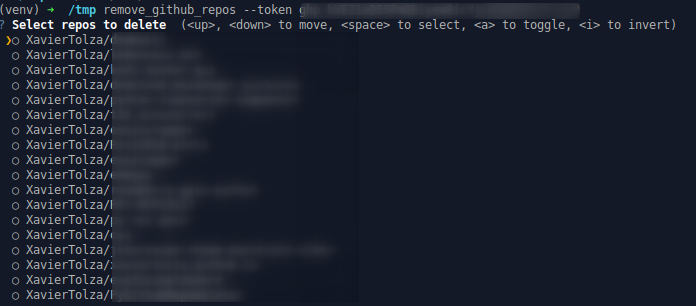
Or also with python3+:

pip install git+https://github.com/XavierTolza/PyGithubRepoDeleter.git
remove_github_repos --token <your token>

image

This still works. Thanks!

@itsjavi

itsjavi commented Feb 23, 2026

Copy link
Copy Markdown

For deleting organization team repos

  1. Generate a personal access token with 'delete_repo' permission: https://github.com/settings/tokens/new
  2. Open the teams repositories view and run following in the browsers console
let repos = ''
const el = document.querySelectorAll('#org-team-repositories > ul > li > div:nth-child(1) > div > div:nth-child(2) > a > span').forEach(e => {repos = repos + `"${e.innerText}"\n`})
console.log(repos)
  1. Copy paste the output to @aug2uag shell script and run it (fixed extra space typo in it):
#!/bin/bash

repos=(
	"username/repo1"
	"username/repo2"
	"username/repo3"
)

for i in "${repos[@]}"
do
   : 
   echo 'Delete' "$i";
   curl -XDELETE -H 'Authorization: token XXXX' "https://api.github.com/repos/$i";
done

Best solution, without third-party tools.

This works for me in 2026 for personal repositories (paginated):

let repos = ''
const el = document.querySelectorAll('#user-repositories-list [itemprop~=codeRepository]')
    .forEach(e => {repos = repos + `"${e.innerText}"\n`})
console.log(repos)

@christianpaez

Copy link
Copy Markdown

Still useful, thanks a lot!

@vinthefantastic1

vinthefantastic1 commented May 21, 2026

Copy link
Copy Markdown

For Windows Users: Use PowerShell to delete multiple repos

Install the github command line tool:

https://cli.github.com/

Login with the command line tool:

gh auth refresh -s delete_repo

GET the list of current repos:

`gh repo list your_login_name_here --limit 500 --json nameWithOwner -q ".[].nameWithOwner" > my-repos.txt`

COPY my-repos.txt delete-repos.txt

DELETE all repos in delete-repos.txt file:

	Get-Content .\delete-repos.txt | ForEach-Object {
		Write-Host "Deleting $_"
		gh repo delete $_ --yes
	}

Sign up for free to join this conversation on GitHub. Already have an account? Sign in to comment