
-
Star
(388)
You must be signed in to star a gist -
Fork
(71)
You must be signed in to fork a gist
-
-
Save justintv/168835 to your computer and use it in GitHub Desktop.
| # If you work with git, you've probably had that nagging sensation of not knowing what branch you are on. Worry no longer! | |
| export PS1="\\w:\$(git branch 2>/dev/null | grep '^*' | colrm 1 2)\$ " | |
| # This will change your prompt to display not only your working directory but also your current git branch, if you have one. Pretty nifty! | |
| # ~/code/web:beta_directory$ git checkout master | |
| # Switched to branch "master" | |
| # ~/code/web:master$ git checkout beta_directory | |
| # Switched to branch "beta_directory" | |
| # ~/code/web:beta_directory$ |


I edited mine to show whether there's uncommitted changes on the current branch

# prompt
FMT_BOLD="\[\e[1m\]"
FMT_DIM="\[\e[2m\]"
FMT_RESET="\[\e[0m\]"
FMT_UNBOLD="\[\e[22m\]"
FMT_UNDIM="\[\e[22m\]"
FG_BLACK="\[\e[30m\]"
FG_BLUE="\[\e[34m\]"
FG_CYAN="\[\e[36m\]"
FG_GREEN="\[\e[32m\]"
FG_GREY="\[\e[37m\]"
FG_MAGENTA="\[\e[35m\]"
FG_RED="\[\e[31m\]"
FG_WHITE="\[\e[97m\]"
BG_BLACK="\[\e[40m\]"
BG_BLUE="\[\e[44m\]"
BG_CYAN="\[\e[46m\]"
BG_GREEN="\[\e[42m\]"
BG_MAGENTA="\[\e[45m\]"
BG_RED="\[\e[41m\]"
parse_git_bg() {
[[ $(git status -s 2> /dev/null) ]] && echo -e "\e[43m" || echo -e "\e[42m"
}
parse_git_fg() {
[[ $(git status -s 2> /dev/null) ]] && echo -e "\e[33m" || echo -e "\e[32m"
}
PS1="\n${FG_BLUE}╭─" # begin arrow to prompt
PS1+="${FG_MAGENTA}" # begin USERNAME container
PS1+="${BG_MAGENTA}${FG_CYAN}${FMT_BOLD} " # print OS icon
PS1+="${FG_WHITE}\u" # print username
PS1+="${FMT_UNBOLD} ${FG_MAGENTA}${BG_BLUE} " # end USERNAME container / begin DIRECTORY container
PS1+="${FG_GREY}\w " # print directory
PS1+="${FG_BLUE}${BG_CYAN} " # end DIRECTORY container / begin FILES container
PS1+="${FG_BLACK}"
PS1+=" \$(find . -mindepth 1 -maxdepth 1 -type d | wc -l) " # print number of folders
PS1+=" \$(find . -mindepth 1 -maxdepth 1 -type f | wc -l) " # print number of files
PS1+=" \$(find . -mindepth 1 -maxdepth 1 -type l | wc -l) " # print number of symlinks
PS1+="${FMT_RESET}${FG_CYAN}"
PS1+="\$(git branch 2> /dev/null | grep '^*' | colrm 1 2 | xargs -I BRANCH echo -n \"" # check if git branch exists
PS1+="\$(parse_git_bg) " # end FILES container / begin BRANCH container
PS1+="${FG_BLACK} BRANCH " # print current git branch
PS1+="${FMT_RESET}\$(parse_git_fg)\")\n" # end last container (either FILES or BRANCH)
PS1+="${FG_BLUE}╰ " # end arrow to prompt
PS1+="${FG_CYAN}\\$ " # print prompt
PS1+="${FMT_RESET}"
export PS1
Probably the most rich solution I found so far: https://github.com/diogocavilha/fancy-git

I would like to see my python virtual environment (venv) as well, as it is usually the case when using MINGW64-git-bash.
So previously, the venv "projectname-venv" was shown in parentheses on the left, but after applying some fancy PS1-command to change the style, coloring and make the current git-branch appear on the right, the venv is missing afterwards.
(projectname-venv) andylu@hd1pcms0347:/mnt/c/Users/username/Projects/projectname$
PS1='\[\033[0;32m\]\u\[\033[0;36m\] @ \[\033[0;36m\]\h \w\[\033[0;32m\]$(__git_ps1)\n\[\033[0;32m\]└─\[\033[0;32m\] \$\[\033[0;32m\] ▶\[\033[0m\] '

andylu @ hd1pcms0347 /mnt/c/Users/username/Projects/projectname (feature/story-43052-dev)
└─ $ ▶ ls
I'd like to have a PS1-command including the venv.


@Lulalaby You need to set the terminal font to a nerd font (patched fonts that replace unused characters with different icons). You can get nerd fonts from https://www.nerdfonts.com/font-downloads. The one I'm using is FantasqueSansMono
thanks!

I just recently started using this and works perfectly.
git_branch() {
if [
git branch 2>/dev/null | grep '^*' | colrm 1 2 | wc -l-eq 1 ];
then
echo -n "("
echo -ngit branch 2>/dev/null | grep '^*' | colrm 1 2
echo -n ")"
fi}
PS1='[\033[0;32m][\033[0m\033[0;32m]\u[\033[0;36m] @ [\033[0;36m]\h \w[\033[0;32m]
$(git_branch)\n[\033[0;32m]└─[\033[0m\033[0;32m] $ [\033[0m\033[0;32m] ▶[\033[0m] '
This will not have () if there is no branch found.
And it will write with a () if there is a branch.

Optimization wrt slow prompt rendering :
How to make the prompt display INSTANTLY, whatever the complexity of the git state computation ?
-> by NOT performing any git state computation, UNLESS the working directory has changed, OR git command was run.
PROMPT_COMMAND='history1=`history 1`;
if [[ $PREVIOUS_PWD != $PWD || ( $history1 == *" git "* && $history1 != $PREVIOUS_CMD ) ]];
then GITBRANCH=`__git_ps1`;  # or whatever git state computation commands
fi;
PREVIOUS_PWD=$PWD; PREVIOUS_CMD=$history1;'

PS1='\[\033[32m\]\u@\h \[\033[33m\]\w\[\033[36m\]$GITBRANCH\[\033[0m\]\n$ '
# or whatever prompt rendering, as long as it embeds $GITBRANCH which has been conditionally computed above

Could any of you share the fonts you are using in your terminals? Especially the ones with the file and folder icons?
-> by NOT performing any git state computation, when the working directory has NOT changed.
But then the prompt doesn't change when you switch branches.
-> by NOT performing any git state computation, when the working directory has NOT changed.
But then the prompt doesn't change when you switch branches.
You're correct.
So let's improve & rephrase the optimization :
"-> by NOT performing any git state computation, UNLESS the working directory has changed, OR git command was run."
I updated my original proposed solution accordingly.

I created my own version for displaying the git branch in prompt starting from @vankasteelj reply (wrote on Mar 7, 2016).
It is a simple solution that includes branch status color. Take a look:
parse_git_bg() {
  if [[ $(git status -s 2> /dev/null) ]]; then
    echo -e "\033[0;31m"
  else
    echo -e "\033[0;32m"
  fi
}

PS1='\[\033[0;32m\]\[\033[0m\033[0;32m\]\u\[\033[0;34m\]@\[\033[0;34m\]\h \w\[$(parse_git_bg)\]$(__git_ps1)\n\[\033[0;32m\]\$\[\033[0m\]
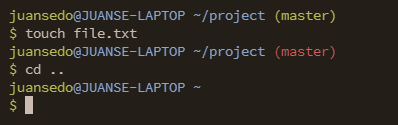
Based. Thanks.


1 as True or correct command, and if it is 0, then it is false or wrong.
parse_git_branch() {
    git branch 2> /dev/null | sed -e '/^[^*]/d' -e 's/* \(.*\)/\1/'
}

export PS1="╭─╼[\[\e[1;36m\]\w\[\e[0m\]]-(\`if [ \$? = 0 ]; then echo \[\e[32m\]1\[\e[0m\]; else echo \[\e[31m\]0\[\e[0m\]; fi\`)-[\[\e[1;32m\]\h\[\e[0m\]]\n╰─ \u\$(if git rev-parse --git-dir > /dev/null 2>&1; then echo '@git:('; fi)\[\e[1;34m\]\$(parse_git_branch)\[\e[0m\]\$(if git rev-parse --git-dir > /dev/null 2>&1; then echo ')'; fi) >> "


PROMPT_DIRTRIM=2

Good job! Thank you a lot!

Thank you



Working fine
function parse_git_dirty {
[[ $(git status 2> /dev/null | tail -n1) != "nothing to commit, working tree clean" ]] && echo ""
}
function parse_git_branch {
git branch --no-color 2> /dev/null | sed -e '/^[^*]/d' -e "s/ (.*)/(\1$(parse_git_dirty))/"
}
export PS1='[\e[\033[01;34m]\u@\h [\e[38;5;211m]\W[\e[\033[38;5;48m]$(parse_git_branch)[\e[\033[00m]$ '
he11 yeah! This color scheme is hands down the best on the internet. No contest. If this was mortal kombat this color code whispers "finish them"

I edited a bit @vankasteelj's stuff and made something like zsh, to react to git's changes
If there are some changes then the color changes to orange or whatever, like in zsh (or fish also, I don't know) so, to do that, you need to create a function
function changes_in_branch() {
    if [ -d .git ]; then
	if expr length + "$(git status -s)" 2>&1 > /dev/null; then
	    echo -ne "\033[0;33m$(__git_ps1)\033[0m";
	else
	    echo -ne "\033[0;32m$(__git_ps1)\033[0m"; fi;
    fi
}
and then simply just add that function to the
PS1stuff. Just like this:PS1='\[\033[0;32m\]\[\033[0m\033[0;32m\]\u\[\033[0;36m\] @ \[\033[0;36m\]\h \w\[\033[0m\]$(changes_in_branch)\n\[\033[0;32m\]└─\[\033[0m\033[0;32m\] \$\[\033[0m\033[0;32m\] ▶\[\033[0m\] '
Works perfect in a Laptop with WSL and Ubuntu. I recently moved to a Macbook with M1, tried to use the same logic unsucessfully. After some tweaks I edited the changes_in_branch() function to make it work in my Mac. This is the result:
function changes_in_branch() {
    if [ -d .git ]; then
        ChangesStr="$(git status -s)"
        if [[ -n $ChangesStr ]]; then
            echo -ne "\033[0;33m$(__git_ps1)\033[0m";
        else
            echo -ne "\033[0;32m$(__git_ps1)\033[0m"; fi;
    fi
}
I had also to install bash-git-prompt in order to make work __git_ps1

do I do it like above ? Dont mind the emoji, I know its representing the user's machine name.
It shows only the repository name, (not including its path if it were to go into a subfolder), git:(current branch), and some x. Tried to search online but could not find any.
So in short (user)@(repo name only)git:(current branch)(space)x
Sorry I forgot I am using zsh.
have you tried zsh+omz ?
https://github.com/ohmyzsh/ohmyzsh/wiki/Themes

Notice the squares at the start of the lines, why am I getting those ?
I love it otherwise
Heyy @javahaxxor
when i 'ls' my files and folders appear vertically. How do i make it look horizontally like you have in the above image??

I love it otherwise
What is this for?

PS1="\[\e[0;1;34m\]\W \[\e[0;1;33m\]\$(git branch 2>/dev/null | grep '^*' | colrm 1 2)\[\e[0;7;0;37m\]$ "
Try this, for minimal text on terminal, with present working directory in blue and branch in yellow color

[...]
git branch 2>/dev/null | grep '^*' | colrm 1 2[...]
Or with a newer Git:
git branch --show-current 2>/dev/null
It's not shorter, but easier to understand ;-)
git branch --show-current 2>/dev/null
Is not working with newer git
This has been supported since at least Git 2.28.0, but let us not spend any more time on this. Your solution works for all versions :-)

PS1='[\033[0;32m][\033[0m\033[0;32m]\u[\033[0;36m] @ [\033[0;36m]\h \w[\033[0;32m]$(__git_ps1)\n[\033[0;32m]└─[\033[0m\033[0;32m] $[\033[0m\033[0;32m] ▶[\033[0m] '
Excellent! Thanks!

Great collection!

Any way to make the path part of the prompt git-aware?
I'd want it to behave similarly to how it is homedir aware, with highlighting via different colors git's rootdir (not submodule's rootdir, mind you) and the rest of the path
Sort of like this: ~/path/to/GITROOT (BRANCH) path/in/tree
if not even GITROOT (BRANCH) path/in/tree ignoring path to the root
WOOOW..Thanks a lot for this. :D